

Dexko Global
Index 101 - Order Trailer Parts Online
Check out our videos and helpful questions and answers to learn all about how to use Dexter Index.
Questions & Answers
How do I gain access to Dexter Index?
You can gain access to Dexter Index as a Dexter Distribution account holder by completing the Request Access form with your account number. Your login credentials will be your email address and the password credentials of your choice.
How do I place an order?
You can place an order directly through Dexter Index by logging in at the login page, searching for the desired parts, adding them to your cart, and completing checkout after selecting ship to address, shipping method, and inputting your required purchase order number.
How do I look up an existing order?
After logging in, you can see existing orders from the last 120 days in "Order History" under the user dashboard.
Where do I find my account number?
Your account number is listed at the top of your invoices and under “Account Settings” in your Dexter Index profile. For more help finding your account number visit the Find My Account helper page.
How do I order an item not on Index?
If an item you need is not showing up in search on Index, please let us know. Dexter Customer Service Representatives can add items to existing open orders. In addition, we continue to work to add all active items on Dexter Index.
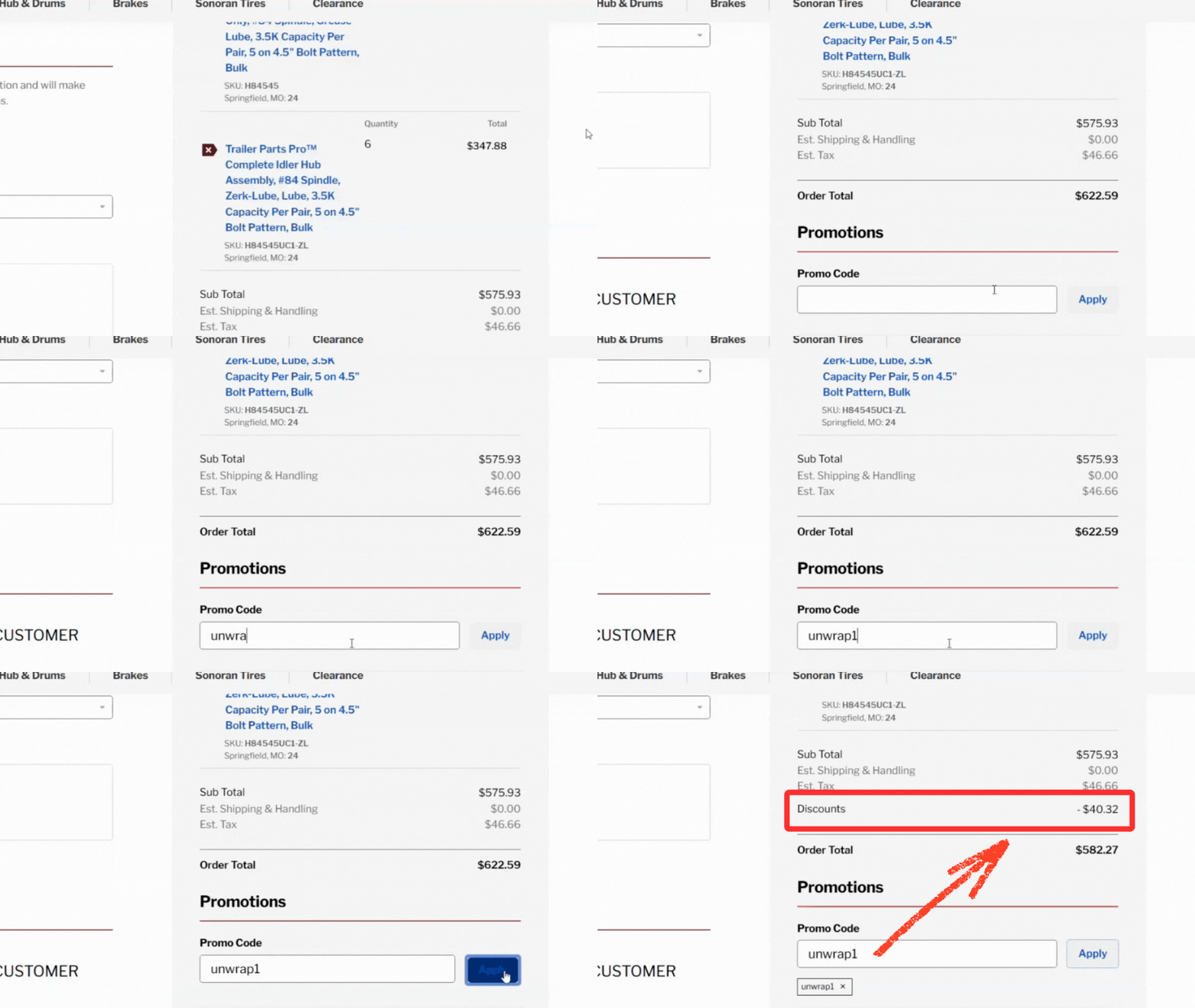
I have a promo code. Where do I enter it?
Promo codes must be entered into the Promo Code box on the Checkout page, prior to placing your order. Promo codes cannot be applied retroactively once your order is placed.
How do I pay an invoice?
Invoices can be paid online using a credit card, ACH, or your account terms. Go to “Invoices” under your profile to make a payment.
Can I change or cancel an order after placing it?
Orders can only be modified or canceled before shipment. Contact Customer Service immediately to make changes.
What browsers work best with DexterIndex?
We recommend using the latest versions of Chrome, Edge, or Firefox for the best experience.
How can I track my shipment?
Once shipped via parcel carriers, tracking numbers appear in the order details page. Click the tracking link for real-time carrier updates.
Can I save favorite items for later?
Items that you frequently purchase can be put into a Saved Cart and saved for later. Saved Carts are created by adding items to the cart, clicking Save Cart, naming the cart, and then viewing the cart under Saved Carts.
How do I reset my password?
Use the “Forgot Password” link on the login page to reset your password. You’ll receive an email with reset instructions.
How do I update my shipping address?
Go to “Account Settings” and edit your saved addresses under “Shipping Information.” Addresses are then saved under Delivery Addresses.
Do you offer expedited shipping?
Yes, expedited shipping options appear during checkout based on your delivery address.
Can multiple users access the same account?
Yes, one account number can have many users for access to Index. Each user email address must create their own specific login using the account number.
Who do I contact for technical issues?
Reach out to our Customer Service team via the “Contact Us” form, calling us at 1-877-973-3632, or by emailing support@dexterindex.com.
What if I have a return or a warranty claim?
If you have a return or warranty claim, you can visit the helpful “Returns and Warranty Claims” page on Index for steps on how to initiate your return or warranty.
I can't find the axle I need. How can I find it?
On Index, you can configure the axles you need under “My Axles.” The made-to-order axle form allows you to configure the specifications you need and submit for quote. Made-to-order axles are typically quoted within 1 hour.
Videos & How-Tos


Click a thumbnail to open the video.
